The How-To Guide For Boolean Searches
Many people are familiar with the term Boolean, but very few could define what it means.
And to be fair, “Boolean” appears in many mathematical concepts (Boolean algebra, circuit, network, processor…), only few of which are relevant for those in the talent profession.
Where it really matters, though, is in database searches. Boolean operators are essential building blocks in sophisticated query logic, making searches more precise and relevant.
Here’s a short primer about the concept and how it applies in Pirical’ legal search engine Pirical Legal Professionals.
What’s in a name?
George Boole was a 19th century self-taught mathematician who created the foundations for modern computing.
It’s largely due to him that we have the concept of 0s and 1s. Every complex piece of information can be boiled down to a string of zeros and ones. Viewed through that lense, even the entire universe becomes, theoretically, manageable. We just don’t yet have the computing power to manage it all.
It was also Boole who developed what we today call “Boolean operators”: NOT, OR, and AND.
How NOT, OR, and AND make your life easy
NOT is hot
Any good search engine has Boolean operators integrated in their query logic. If you want to search for turkey and have the country, not the bird in mind, you simply google “turkey -bird”, (the minus being Google’s short form of NOT) and your results will be all about maps, holiday destinations and the latest Erdogan news.
By using the NOT operator in Google, you have limited your search to those results that do not contain any mention of the word bird.
(Moreover, Google is smart enough to exclude even those results which don’t contain the term “bird” but clearly are about the bird, e.g. a cooking recipe that doesn’t mention “bird”.)
The Golden OR
OR serves to broaden your search. If you were to search for results about the decade of flower power, you’d search “60s OR 1960s OR Sixties”.
AND’s the stANDard
AND, on the other hand, serves to narrow your search. If you wanted to search for the average retirement age in the UK, you’d search “UK AND retirement AND age”.
AND has been made obsolete by most search tools including Google, who have long understood that a string of multiple words most often implicitly assumes an AND logic (to stay with the previous example, you simply type “UK retirement age”.)
It’s important to know that while every good search engine and other database query system has some form of Boolean logic, not all are the same and it’s worth familiarising yourself with the Boolean operators a given database query system uses.
Which brings us to Pirical Legal Professionals.
Pirical Legal Professionals’ Boolean operators.
Pirical Legal Professionals is our search engine for legal talent. 350,000 lawyers in 130 countries working at over 1,000 firms are in our database, each with reams of data attached to them.
That kind of data volume requires plenty of sophistication in the algorithms it uses. Clients significantly benefit if they upgrade their searches with Boolean operators.
Our Boolean logic is as follows:
General rules
Boolean search will only work in the keyword field.
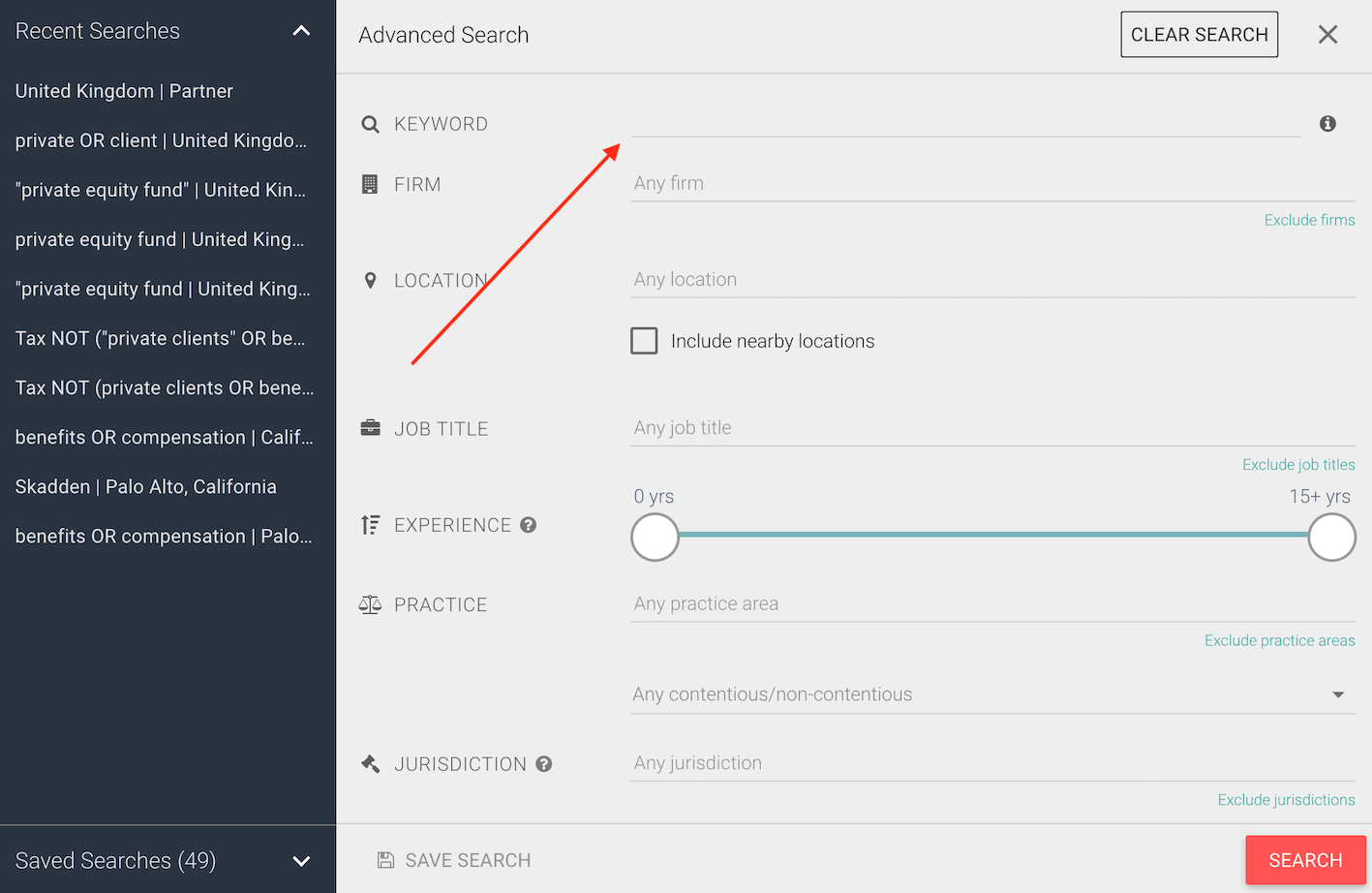
Also, Booleans in Pirical Legal Professionals require uppercase spelling. This is the only area where the case matters - otherwise, it is irrelevant whether you write m&a or M&A.
NOT searches
To exclude a particular term, type that term with an uppercase NOT immediately before it. E.g. corporate NOT M&A.
OR searches
To see results that include one or more terms in a list, separate the terms with an uppercase OR. E.g. insurance OR injury.
AND searches
AND is optional. For example, you can type finance AND projects, or you can just omit that operator.
PHRASE searches
To see only results that include a specific phrase you will need to use quotation marks. For example, you can type in “private client” which will only search for that exact phrase.
Multiple condition searches
Of course, you can combine booleans. You can do so by using parentheses.
To find Tax lawyers who do not work with private clients and don’t cover benefits, you search “Tax NOT (“private client” OR benefits)”.
Wildcard searches
A very useful operator (dare we say “life hack”) is the asterisk *, known as a wildcard. The asterisk represents one or several letters. For example, to find people who have words starting with “fin” in their profiles (“finance”, “financing”, “financial” etc.), simply type fin* in the keyword field.
Bringing it all together
Some lawyers may have “private clients”, and some “private client” in their profile. So you could optimise the query mentioned under the Multiple Condition Searches headline above (and using all Boolean operators at your disposal) by typing “Tax NOT (private client* OR benefits)”.
Ta-dah!

Stay up-to-date with the latest market insights and law firm rankings
Subscribe to email updates
Subscribe to content